
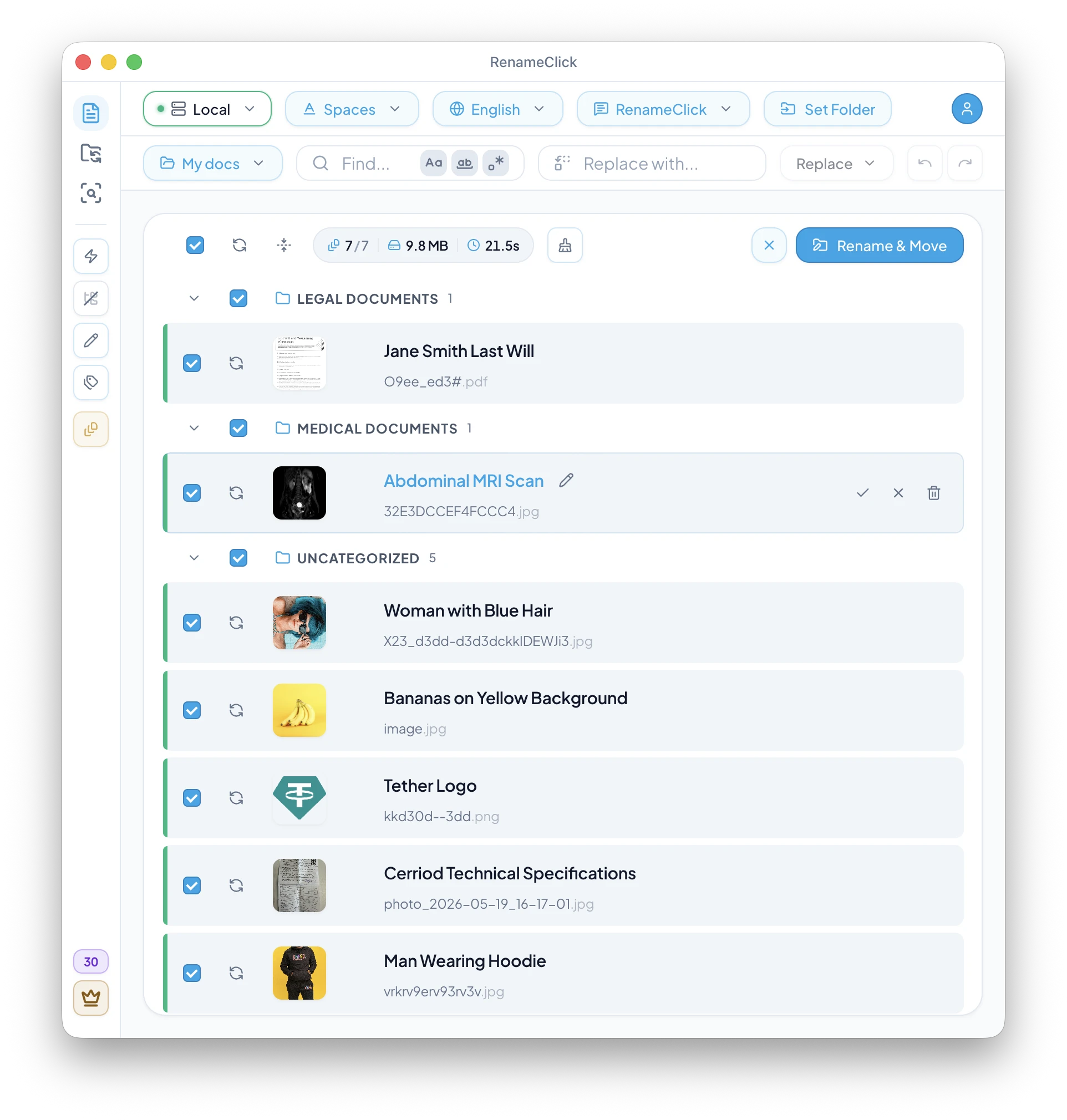
If you want SEO image file name best practices, start with a simple rule: search engines use the filename as a helpful clue about what an image shows. A file called modern-home-office-desk-setup.jpg gives Google clear signals about the content. A file called IMG_4829.jpg gives it nothing.
If you run a blog, e-commerce store, portfolio, or any website with images, descriptive filenames are one of the easiest SEO wins available. This guide covers naming rules, Google Images context, and how RenameClick can work as an AI-assisted image file name generator before upload.
Filenames are not the whole story, though. Alt text, surrounding page copy, and page relevance matter more than the filename alone, so the goal is a consistent package of signals, not one “magic” rename.

Key takeaways
- Image file names are useful SEO clues, but alt text and page context matter more.
- Use descriptive, keyword-rich names with hyphens as separators.
- Rename images before uploading — CMS platforms often keep the original name in the URL.
- AI tools can generate accurate descriptive names at scale, saving hours of manual work.
Why image file names matter for SEO
Google's own image SEO documentation says filenames can give Google very light clues about the subject matter of an image. That makes filenames worth fixing, but not something to treat as a standalone ranking weapon.
Image search drives significant traffic — especially for visual industries like travel, food, fashion, interior design, and e-commerce. A well-named image can appear in Google Images, Google Lens results, and even regular web search when the image pack shows up.
The practical reason filenames still matter is persistence: the name often survives into the URL, CMS, CDN path, exports, and re-uploads. It is a low-cost signal you control before publishing.
How Google reads image file names
When Googlebot crawls a page and encounters an image, it processes several signals:
- File name — the URL path including the image name.
- Alt text — the
altattribute in the HTML. - Surrounding text — captions, headings, and nearby paragraphs.
- Page title and URL — the broader context of the page.
- Structured data — schema markup for products, recipes, etc.
Filenames are one of the more persistent signals because they often survive into the URL. But Google also states that alt text is the most important attribute when it comes to providing more metadata for an image. A name like red-leather-laptop-bag-front-view.jpg continues to provide context wherever the image appears, but it works best when the page copy and alt text support the same topic.
Best practices for SEO-friendly image names
- Be descriptive and specific —
blue-ceramic-coffee-mug-on-wooden-table.jpgbeatsmug.jpgorproduct-1.jpg. - Use hyphens as separators — Google treats hyphens as word separators. Underscores are joined (
coffee_mugis read as one word). Spaces become%20in URLs. Google's filename guidance also prefers lowercase, hyphen-separated names. - Use lowercase — avoids duplicate URL issues on case-sensitive servers.
- Include target keywords naturally — if the page targets "leather laptop bag," use that phrase in the image name. Don't keyword-stuff.
- Keep it concise — 3–8 words is ideal. Extremely long names get truncated in search results.
- Use the right format — WebP for web images (smaller files, faster loading), JPEG for photos, PNG for graphics with transparency.
Common image naming mistakes that hurt SEO
- Camera defaults —
IMG_4829.jpg,DSC_0042.jpg,Screenshot 2025-01-15.png. Zero SEO value. - Generic names —
image1.jpg,photo.png,banner.webp. Tells search engines nothing. - Keyword stuffing —
best-cheap-leather-bag-buy-now-sale-discount.jpg. This looks spammy and may hurt rankings. - Underscores instead of hyphens —
coffee_mug.jpgis read as "coffeemug" by Google. Usecoffee-mug.jpg. - Renaming after upload — many CMS platforms (WordPress, Shopify) keep the original file name in the URL even if you change the title later. Rename before uploading.
Image naming for e-commerce products
For product images, include the product name, key attribute (color, size, material), and view angle when relevant:
brown-leather-messenger-bag-front.jpgbrown-leather-messenger-bag-side-pocket-detail.jpgwireless-bluetooth-headphones-black-on-ear.jpg
This naming pattern aligns with how people search ("brown leather messenger bag") and helps your product images rank in Google Shopping and image search results.
Image naming for blogs and portfolios
Blog images should describe the visual content and relate to the article's topic:
home-office-setup-standing-desk-dual-monitors.jpg(for a productivity article)sourdough-bread-scoring-pattern-close-up.jpg(for a baking tutorial)tokyo-shibuya-crossing-night-rain.jpg(for a travel post)
For portfolio sites (photographers, designers), descriptive names also help potential clients find your work through image search — a major discovery channel for visual professionals.
AI-powered SEO image naming with RenameClick
Manually writing descriptive names for hundreds of product photos or blog images is tedious. RenameClick automates this by analyzing the actual visual content of each image with a local AI model and generating a descriptive name.
For SEO-optimized output, combine RenameClick features:
- Format pattern: use
$lower{$1}to generate lowercase hyphenated names (e.g.,modern-home-office-desk-setup). - Custom prompt: instruct the AI to focus on specific attributes (e.g., "describe the product, its color, material, and view angle").
- Find & Replace: batch-edit names to add consistent prefixes or adjust keywords across all images at once.
- Batch processing: drop an entire folder and process hundreds of images in one go.
Since RenameClick runs locally, your product images and unpublished content never leave your device during the renaming process.
If you want to standardize the output, combine image descriptions with Format Patterns rather than manually renaming every file.
A practical SEO image workflow
Here's a recommended workflow for preparing images before publishing:
- Collect — gather all images for the post/product in one folder.
- Rename — drop the folder into RenameClick. Use a lowercase slug format for web-safe names.
- Review — check suggested names. Use Find & Replace to add prefixes (e.g., brand name) if needed.
- Optimize — compress images (TinyPNG, Squoosh, or your build pipeline).
- Upload — upload to your CMS. The descriptive file name is now embedded in the URL.
- Alt text — add alt attributes that complement (not duplicate) the file name.
This takes minutes with AI-assisted renaming versus hours of manual work for large image sets.
FAQ
What is the best image filename for SEO?
Should I use hyphens or underscores in image names?
Can I rename images after uploading to WordPress?
How many words should an image file name have?
Can AI generate SEO-friendly image names?
Want to try this workflow?
RenameClick runs offline by default and helps you rename and organize files by content — with a review-first flow.